
Angel Eye Mobile
AngelEye HealthMedical
4.2807.00 Reviews
- Version
- 5.13.1
- Installs
- 100.00K
- Age Rating
- Teen
Screenshots
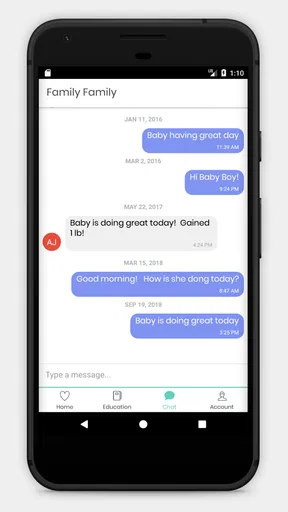
Our Review of Angel Eye Mobile
 Analysis by Appyee
Angel Eye Mobile is a medical app with a very specific purpose: it belongs to the Angel Eye Camera Systems Communication Platform, created by AngelEye Health. I found that focus important from the start because this is not a general wellness tool, a symptom checker, or a replacement for a hospital’s normal communication channels. Its value depends on being part of the right care environment, where authorized people need a practical way to stay connected with a patient-care setting.
That narrow role is also the reason I would not recommend installing it casually and expecting it to work like an ordinary standalone app. The experience makes sense when it is connected to the Angel Eye system used by a medical team or facility. If that describes your situation, the app can become a reassuring point of contact. If it does not, it is unlikely to offer much on its own.
As a free medical app for teens and older users, it is easy to try from a cost perspective. It has been available since September 25, 2018, and the current version is 5.13.1, with support beginning at Android 5.0. Its average rating is 4.2 from around 2.5 thousand ratings, while the app has passed 100 thousand installs. Those figures suggest that it has reached a meaningful audience, but they do not change the most important practical question: whether your care provider uses the Angel Eye communication platform.
Why the communication capability matters
The central capability here is communication around care, not independent diagnosis or treatment. In my view, that distinction is the key to understanding the app. A medical camera system can be useful only when the people who need access are able to receive the relevant connection through an approved channel. Angel Eye Mobile is designed to be that mobile-facing part of the wider system.
In an everyday situation, this could mean a family member using a phone to remain connected with a loved one receiving care while the clinical team continues its work. The benefit is not simply having another app on the phone. The benefit is reducing the distance between the care setting and the person who is trying to stay informed or emotionally present.
I would describe the app as a bridge rather than a complete destination. It does not replace a clinician’s explanation, a scheduled consultation, or urgent medical assistance. Instead, its usefulness comes from fitting into an existing communication process. That makes it different from broad medical apps that offer medication reminders, appointment booking, health records, or educational articles.
The most important insight is that Angel Eye Mobile is valuable because of the surrounding system, not because it is a general-purpose medical app. Someone downloading it without an invitation, account arrangement, or connection to a participating care environment may find the experience limited. That is not necessarily a flaw in the design; it is a consequence of its specialized job.
The camera connection is more than a convenience
When a family is separated from a patient-care setting, ordinary updates can feel incomplete. A phone call may provide information, but it does not always provide the same sense of presence. A camera-based communication platform can help close that emotional gap when it is used appropriately and when access has been arranged by the care team.
In my experience with apps in the medical category, the best ones are often not the ones with the largest collection of tools. They are the ones that remove a particular source of stress. For Angel Eye Mobile, that source of stress is the uncertainty created by distance. A mobile connection can make it easier for an authorized relative or caregiver to remain involved without repeatedly calling the unit or relying on scattered messages.
There is an important human boundary here. Seeing or communicating around a care environment can be comforting, but it can also be emotionally difficult. I would use the app as a way to stay connected, not as a reason to monitor constantly. A clear routine agreed with the care team is likely to be healthier than checking repeatedly throughout the day.
What using it in practice feels like
The practical experience begins before the app itself. The medical facility or care team needs to establish the relationship between the user and the Angel Eye system. That means the first step for a prospective user is usually not changing phone settings or exploring menus; it is asking the relevant care provider how mobile access is arranged.
Once access is available, the app’s role is easier to understand. The phone becomes the portable side of the communication platform, allowing the user to connect from a location away from the care setting. This is particularly useful for someone who cannot remain physically nearby but still wants a more direct connection than occasional verbal updates can provide.
One of my practical tips is to treat the app as part of a planned communication routine. Before relying on it, I would confirm who is allowed to use it, when connection is appropriate, and what to do if the app is unavailable. Keeping a normal contact method for the medical team is sensible because a platform-based mobile connection should not be treated as an emergency line.
A second useful tip is to prepare the phone before an important connection. A charged battery, a stable connection, and a quiet place can make the experience less frustrating. These are ordinary details, but they matter more with a medical communication tool than with a casual social app because the user may already be worried or tired.
A third insight is that the app should not be judged only by how it behaves when opened alone. Its performance and usefulness depend on the connected camera system and the way the facility has configured access. If something does not appear as expected, the right solution may be contacting the care team rather than repeatedly reinstalling the app.
A realistic family scenario
Imagine a parent whose child is receiving care while the parent must briefly leave the hospital or remain at home with another family member. A normal messaging app might allow the parent to ask for an update, but it would not necessarily provide the same structured connection to the care environment. Angel Eye Mobile can be useful in that gap because it is intended to connect the mobile user with the Angel Eye camera platform.
In that scenario, I would set expectations carefully. The parent should still follow the medical team’s instructions, use the hospital’s normal contact route for questions, and understand that a camera connection does not explain every clinical change. The app’s strength is presence and communication, not independent interpretation.
The emotional effect can be significant. A brief, appropriate connection may help a family member feel less excluded from the care process. It can also make it easier to share a sense of support when physical visits are difficult. That is a more specific benefit than the vague promise of “staying connected”: it addresses the experience of being separated during a stressful medical period.
Where it differs from ordinary alternatives
The usual alternatives are phone calls, text messages, video-chat services, patient portals, and in-person visits. Each has a different purpose. A phone call is often better for asking a direct question. A patient portal may be better for records or formal updates. A general video-chat app may be more flexible for family conversations. Angel Eye Mobile makes more sense when the relevant medical camera and communication workflow are already in place.
That specialization is both its advantage and its limitation. A general video service may be easier to use between relatives, but it is not automatically connected to a clinical camera system. A patient portal may contain more formal information, but it may not provide the same kind of camera-based connection. Angel Eye Mobile sits in a narrower space: it supports communication linked to the Angel Eye platform rather than trying to replace every other medical or social tool.
For that reason, I would choose it over a generic alternative when the care provider specifically uses Angel Eye and has directed me to the mobile app. I would choose a regular phone call or the facility’s official portal when I need clinical clarification, documentation, or urgent assistance. Choosing the right channel prevents the app from being asked to do a job it was not designed to do.
The tradeoffs that deserve attention
The first tradeoff is dependence on the connected care environment. This is not an app I would expect to provide a complete experience for every user in every location. Its usefulness is tied to the Angel Eye Camera Systems Communication Platform and to the access arrangement established by the medical provider.
The second tradeoff is emotional. A connection can reassure one person and increase worry for another. A user may notice how much they miss the patient or may misread an ordinary moment as a sign of trouble. I think the app works best when the care team explains its purpose and the family agrees on sensible use rather than treating it as an always-on source of reassurance.
The third tradeoff is that mobile convenience can create unrealistic expectations. Because the app is on a phone, it may feel as though communication should be immediate at all times. Medical environments do not work that way. Staff availability, patient needs, privacy, and clinical priorities come first. A delayed response or unavailable connection should not automatically be interpreted as a medical update.
There is also a learning curve caused by the app’s specialized context. Someone comfortable with social video apps may still need guidance because the important part is not only tapping through the interface. The user needs to understand the care workflow, the permitted audience, and the correct route for questions. I see that as a reason for facilities to explain the app clearly, and for users to ask questions before depending on it.
Who gets the most value from it
Angel Eye Mobile is best suited to family members, caregivers, or other authorized people who need mobile access to an Angel Eye-enabled care setting. It is especially relevant when distance, work, travel, or family responsibilities make frequent physical visits difficult.
It may also help people who want a more direct connection than text updates but do not need a full patient portal. The app’s strength is practical and emotional at the same time: it can support communication while helping a person feel involved in a difficult period.
I would skip it if I am looking for symptom tracking, medication management, a directory of doctors, general health education, or emergency advice. I would also skip it if no medical facility has told me that Angel Eye access is available. In those cases, a general medical app, an official patient portal, or a direct call to the provider would be a better match.
For caregivers, my recommendation is to clarify the boundaries before use. Ask what the connection shows, who can access it, when it is active, and whom to contact for medical questions. Those answers are more important than any feature checklist because they determine whether the app fits the actual care situation.
Questions I would settle before relying on it
A prospective user will reasonably want to know whether the app works independently. My answer is no in practical terms: its purpose is to serve as part of Angel Eye’s communication platform, so access needs to be connected to the participating care environment. I would confirm eligibility with the hospital or care team before planning around it.
Another common question is whether it replaces speaking with clinicians. I would not use it that way. The app can support communication and connection, but medical questions, urgent concerns, treatment decisions, and changes in condition should go through the appropriate clinical channel.
Users may also wonder whether a normal phone or a newer device is required. The stated Android requirement begins at version 5.0, which makes the app accessible to a broad range of Android devices. Still, compatibility alone does not guarantee that the connected camera service or the facility’s access process will work exactly as expected, so checking with the provider remains worthwhile.
Because the app is free, cost is not the main barrier. The more important consideration is whether it is relevant to the user’s care situation. I would not install it simply because it is free; I would install it when a medical provider has explained that it is the correct mobile component for staying connected.
My final recommendation
After looking at Angel Eye Mobile as a real medical communication tool rather than a conventional health app, I see a focused product with a clear audience. Its strongest capability is the mobile connection to the Angel Eye Camera Systems Communication Platform, and that capability can matter greatly when a family member is separated from a patient-care setting.
I like the fact that its purpose is specific. It does not need to compete with every patient portal, video-chat app, or wellness tracker. When the surrounding system is available and the user understands the boundaries, the app can make communication feel more immediate and less fragmented.
At the same time, I would not recommend it as a standalone download for general medical needs. Its dependence on an authorized care setting, the emotional weight of camera-based communication, and the need to keep ordinary clinical contact methods available are all important limitations.
My honest advice is simple: if AngelEye Health or your medical facility directs you to use it, Angel Eye Mobile is worth having because it is designed for that exact connection. If you are searching for a broad medical toolbox, choose something built for that purpose instead. For the right family in the right care setting, its focused communication role is the feature that makes it worthwhile.
Verdict
Strengths of Angel Eye Mobile
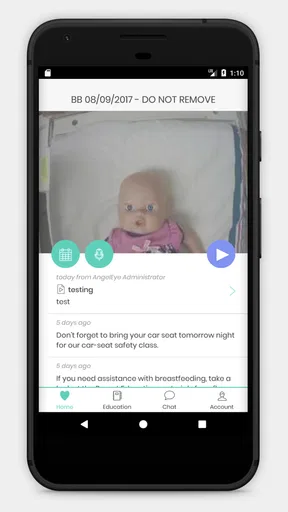
- Live video lets you check in on children or loved ones remotely.
- Motion alerts can help you notice unusual activity quickly.
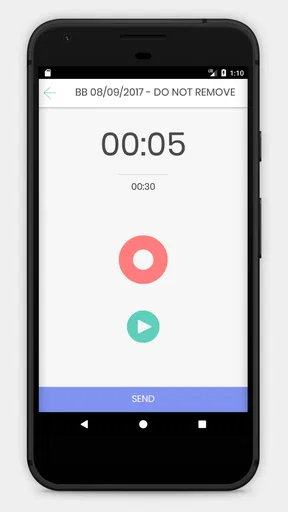
- Two-way audio supports convenient communication from the app.
- Useful for monitoring multiple cameras from one mobile device.
- Remote access can provide reassurance while you are away.
Limitations of Angel Eye Mobile
- Requires compatible Angel Eye camera hardware to work.
- Video quality and reliability depend heavily on your internet connection.
- Notifications may become distracting when motion detection is too sensitive.
- Some features may require an active service plan or hospital account.
- Privacy concerns should be considered when cameras operate in shared spaces.
Similar Picks in This Category
View All
WebMD: Symptom Checker
WebMD, LLC4.1

Microphone Amplifier
DOSA Apps4.2

Anatomy Learning - 3D Anatomy
3D Medical OU4.5

Period Tracker and Calendar
SimpleInnovation4.9

GoodRx: Prescription Coupons
GoodRx4.8

CVS Health
CVS Pharmacy4.5
Frequently Asked Questions
What is Angel Eye Mobile, and who is it designed for?
Angel Eye Mobile is a companion app for Angel Eye monitoring systems, primarily intended for parents, guardians, and authorized family members who want to stay connected with a child or infant receiving care. Depending on the healthcare facility and setup, the app may provide secure access to live video, updates, and communication features. It is not a replacement for professional medical supervision or emergency services.
How do I log in and connect Angel Eye Mobile to my child’s monitoring system?
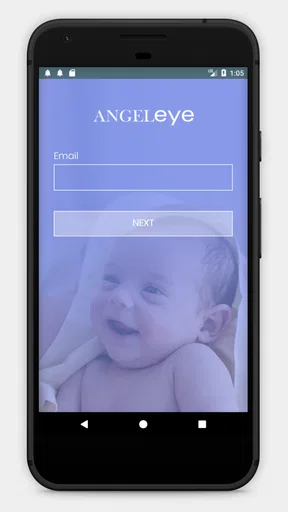
Access usually depends on an invitation or account created through a participating hospital, clinic, or care provider. After installing the app, you generally sign in with the credentials supplied by the facility and follow the on-screen pairing or authorization steps. You cannot normally connect to an Angel Eye system independently, so contact the hospital’s support team if your invitation is missing, expired, or linked to the wrong patient.
Does Angel Eye Mobile provide real-time video, and can I rely on it for medical decisions?
The app may allow authorized users to view a live camera feed or receive updates, depending on the equipment installed and the permissions enabled by the healthcare provider. Video quality and availability can vary with the facility’s network, your internet connection, and maintenance periods. The app should only be used for reassurance and communication; it does not replace bedside staff, clinical monitoring, diagnosis, or emergency assistance.
What permissions, internet connection, and device requirements does the app need?
Angel Eye Mobile generally requires a compatible Android or iOS device, an active internet connection, and permission for functions such as notifications. Video features can use considerable mobile data, especially when viewed away from Wi-Fi, and a weak connection may cause delays or interruptions. Keep the operating system and app updated, enable notifications if needed, and review the store listing for the latest compatibility requirements before downloading.
Is Angel Eye Mobile secure, and what should I do if I lose access to my account?
Because the app can display sensitive family and healthcare-related information, access is normally restricted to approved users and protected by account authentication. Use a strong, private password, avoid sharing login details, and secure your phone with a screen lock. If you lose your device, suspect unauthorized access, forget your password, or see an incorrect patient connection, contact the participating hospital or Angel Eye support promptly for assistance.
